Agent-native game engine · C# · pre-alpha 0.0.1
The world is code.Agents build it.You watch every tick.
- Agent
- Your coding agent reads and changes the game's code while it runs, through skills and MCP.
- Studio
- The human window: watch every agent, edit anything, take over.
- Yours
- Assemble it like Arch Linux: simple, balanced or complete.
git clone https://github.com/Obed0101/ukiyoConcept world · a GT on Chapman's Peak Drive · car CC-BY 4.0 Khronos, sky and road CC0 Poly Haven
Agents plug in. You watch.
Thirty seconds of what ukiyo is for: agents wired into a running game, reading and changing every system and proving it, while a person watches from the Studio and takes over when they want.
Concept film. The agent CLI, the Studio and the open library are in development; the cube frames, the three-target parity and the headless numbers in the last act are real captures from 0.0.1. Car: Car Concept (Khronos, CC-BY 4.0). Road and sky: Chapman's Drive (Poly Haven, CC0). Rendered from code, sound included.
A whole engine, taught to your agent.
Every system an engine has, as source your agent can read and change while the game runs. It connects through skills and MCP: each skill teaches it one system, and checks prove the result with code tests and visual tests on real frames.
Rendering
skill lights, cameras, post
proof golden frames per target
Materials & textures
skill PBR, clearcoat, variants
proof visual diffs on real frames
Physics
skill bodies, tires, collisions
proof headless runs, fixed ticks
Audio
skill mixing, spatial, engine sound
proof offline renders, loudness
Input
skill bindings, devices, replays
proof scripted input replays
Game UI
skill HUD, menus, focus
proof screenshots and focus tests
In progress: the core, three targets and evidence ship in 0.0.1; systems and skills land gate by gate.
Take only what you need.
Like Arch Linux: install what you need and nothing else. Start simple, balanced or complete, both for the Studio on your screen and for the engine, systems and skills your game is built from. Add the rest whenever you want.
- studio
- Agents, their proof, an inspector and the tick timeline.
- game
- Physics, audio and game UI on top of the core.
An open library, not a store.
Models, materials, sounds, templates and whole game systems, published as packages by the community. Every one of them free and open source, with its license and provenance checked, and skills and tests so your agent can use it.
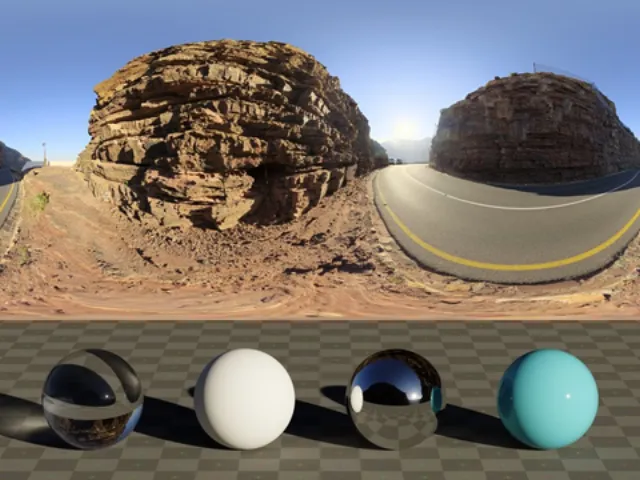
Chapman's Drive
CC0polyhaven/chapmans-driveHDRI · sky and road

Clean Asphalt
CC0polyhaven/clean-asphaltPBR material
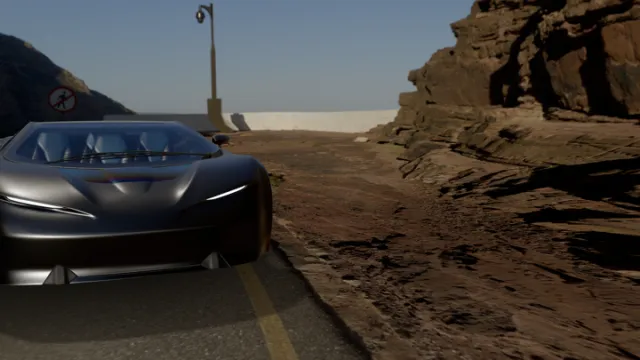
Car Concept
CC-BY 4.0khronos/car-conceptvehicle · glTF
public float Grip(in Contact c) => Pacejka.Lateral(c.Slip, Stiffness); // skill: tuning.md · 18 testsTire Model
MITukiyo/physics-tiresconcept
Speedometer.Bind(car.Speed);
Gear.Bind(car.Gearbox);
// 6 golden frames
HUD Kit
MITukiyo/hud-kitconcept
public float Aperture = 1.8f;
public bool FreezeTick = true;
// visual tests: 6
Photo Mode
MITukiyo/photo-modeconcept
$ ukiyo add polyhaven/chapmans-drive · the package command arrives with the agent CLI; the assets above are real and credited.
This one is not a render.
The car above is where ukiyo is going. This is where it is today: the 0.0.1 web export running on this page. C# computes every tick in WebAssembly and three.js only draws what it is told. Pause it, step it, or call ukiyo.step(60) from the console.
starting .NET WebAssembly · ~5 MB, once
Scroll is time.
The simulation is a pure function of its ticks. Scroll and you move through captures from three real targets of the same Program.cs. They agree on every captured tick.
Δ 0…
One line to run it anywhere.
This is the entire entry point, and every host compiles this exact file. The game owns its state and describes what to draw; renderers only consume that description.
Every run states what it ran: the hash of the source it was built from, the renderer, the backend and the device. Nothing an agent reports has to be taken on faith.
return await GameApplication.RunAsync(new CubeGame(), PlatformBootstrap.Create(args));public void Update(in TickInfo tick){ _rotation = ExpectedRotation(tick.Tick + 1);} public void Extract(FrameBuilder frame){ frame.Camera = FrameBuilder.LookAt(new Vector3(0f, 0.6f, 3.2f), …); frame.Draw(_mesh, _material, Pose.ToMatrix());}[ukiyo] target=desktop game=RotatingCube CubeGame.cs=9846313B6743 Program.cs=138C7579F527[ukiyo] renderer=WgpuRenderer backend=Metal device="Apple M4 Pro" profile=G0Unlit capture=True
Each step closes with evidence.
Read the first report- shipped · 0.0.1
One program, two real renderers
Metal and WebGL2 from the same C#, a single native binary and a static web export.
- next
Runtime slice
Input and platform services, and physics validated on native, NativeAOT and WebAssembly.
- later
Authoring and the agent CLI
Scenes and prefabs as code plus data, validated patches, and the CLI agents plug into.
- later
Studio and presets
The human window onto a running game in simple, balanced or complete layouts, with safe reload.
- later
Evidence and first games
Replays, visual conformance and the first real games built with agents.
- later
The open library
Packages for assets and whole systems, published by the community, free and open source.
Order and scope can still change.
Run it yourself.
Apple Silicon Mac with the .NET 10 SDK, Xcode command line tools, cmake, ninja and bun. Or skip the build and download the 0.0.1 binaries.
Get the code and pinned natives
git clone https://github.com/Obed0101/ukiyo && cd ukiyo && scripts/fetch-native.shRun it with no window and no GPU
dotnet run --project samples/RotatingCube/HeadlessRun it natively on wgpu → Metal
dotnet run --project samples/RotatingCube/DesktopVerify every gate, end to end
scripts/g0.sh